Product identity
Manufacturer SKU, MPN, and model information
Use the manufacturer’s SKU, MPN, model identifier, or configuration code to match the exact equipment and variant.
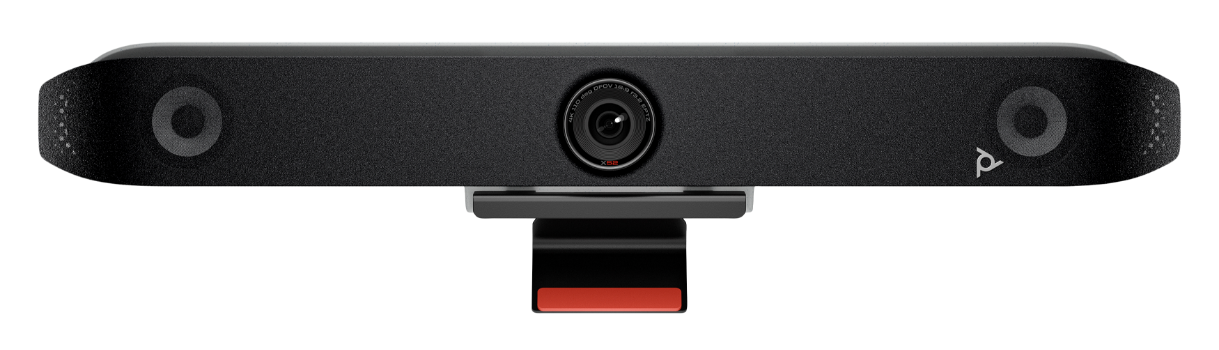
HP Poly Studio X52 All-in-One Video Bar
- Manufacturer identifier
- 8D8K2AA#ABA
- Variant
- Standalone Poly Studio X52, HP US Product #
- Region
- US
- Verified
- Official source
- Manufacturer verification
- Manufacturer identifier
- 7200-87620
- Variant
- Standalone Poly Studio X52, manufacturer product number
- Region
- US
- Verified
- Official source
- Manufacturer verification
- Manufacturer identifier
- 8D8K2AA
- Variant
- Standalone Poly Studio X52, HP base product number
- Region
- Not region-qualified
- Verified
- Official source
- Manufacturer verification
The positive evidence is about a real room
HP positions the Studio X52 for medium rooms and specifies a 20MP 4K camera with a 95-degree horizontal field of view. The integrated camera, microphones, speakers and meeting software can remove the need for a separate room PC in appliance operation.
A 2025 firsthand evaluation paired the X52 with a TC10 controller and used Microsoft Teams. The reviewer reported clear speech from 4.5 meters away and sufficient speaker output for a 24-square-meter room. Tracking moved to an active speaker in about two seconds, and image focus compared favorably with the reviewer's existing desktop bar.
Those observations support the X52's intended role, but their value is in the conditions described. They are not proof that a glass-walled room, a noisy workshop or a much deeper table will perform the same way. Cartennas would use that positive result to justify a pilot, then evaluate the difficult seats and the actual room noise.
Framing is useful only when it follows the conversation
DirectorAI provides framing and tracking, while HP's noise-filtering features address unwanted sound. These tools can make a hybrid meeting easier to follow when the room's seating and camera view are appropriate.
The decision should be made from the remote participant's perspective. Does speaker tracking settle quickly enough to show the person who is still speaking? Does a side conversation cause distracting cuts? Are participants near the display framed as usefully as the far end of the table? A high-resolution camera can produce a poor meeting experience if the chosen framing mode repeatedly selects the wrong view.
The 2025 review described one people-framing function as a preview feature at that time. We would not carry that historical release status forward as a current limitation or assume every subsequent feature behaves exactly like the test. The installed VideoOS and meeting-provider application determine the actual feature set.
The microphone connector is not the whole compatibility decision
HP publishes a compatibility guide that separates Studio X peripherals by model and meeting provider. It also documents a newer X52 arrangement using the HP USB 3.0 to Gig RJ45 Adapter G2, a Studio A2 audio bridge and A2 table microphones. In that arrangement, the onboard LAN connection becomes a link-local network port.
That last detail changes the installation plan. An engineer who sees an Ethernet-shaped connector cannot assume it retains the same role after selecting the new audio design. The supported arrangement must include the adapter, bridge, network path and the applicable software version.
Use the matrix for the provider the room will actually run. An accessory listed under Poly Video or Device Mode is not automatically supported under every native meeting application. This is a substantive distinction when comparing the X52 with a USB-only bar: integrated compute reduces one type of hardware, but makes the software and accessory relationship more consequential.
Guest access needs its own acceptance test
The X52 offers USB Device Mode, allowing a laptop to use the room's camera and audio. The 2025 review found switching between native operation and a guest connection straightforward. In a separate October 2024 owner report, a MacBook Air stopped seeing those peripherals after an update to VideoOS 4.3.2; the public discussion did not document a resolved cause.
That older report should not be presented as a confirmed defect in the current release. It does show why guest access deserves a test after changes. Native Teams registration, a functioning TC10 and a clear room call do not demonstrate that a visitor's laptop can enumerate the same camera and audio over the installed cable path.
Qualify the actual Windows and Mac laptop types with the room's cable or extension system. Include connecting after a native meeting, ending the guest call and returning to the next calendar event. Keep recovery instructions specific to that transition, rather than telling users to reboot an entire room whenever a laptop selects the wrong audio device.
Where the X52 earns its place
We would recommend the X52 for a medium room whose native meeting service and supported expansion path are settled. The firsthand quality results give it a credible foundation, and centralized management can help maintain a fleet of similar spaces.
If guest laptops are the dominant use and a room calendar is unnecessary, compare the installed cost with a simpler USB design. If the room needs complex audio or multiple specialized cameras, resolve those requirements through the compatibility matrix before selecting the bar. The best X52 deployment is the one whose ordinary meeting flow is simple because the underlying choices were made deliberately.
Onsite installation support
Need help installing or replacing the Studio X52?
Cartennas provides onsite installation, replacement, mounting, cabling, and Smart Hands support for business collaboration and AV equipment across the United States.
Request Installation SupportCartennas assessment
The Studio X52 is a persuasive medium-room option when the platform, audio expansion and guest-device transition are qualified together. Its good video and audio evidence should be paired with a version-specific installation design.
Cartennas analysis combining manufacturer specifications and compatibility documents with the dated firsthand evidence described in the review. Review methodology. Cartennas provides product procurement and onsite services. Product review terms.
Official manufacturer information
Confirm the exact model, specifications, licensing, warranty, and support terms directly with the manufacturer.
Product information was checked on September 5, 2026. Specifications, licensing, warranty, availability, and pricing can change.